The post
We get signups, but people stop during onboarding. What would you change first?
Voxily is an X (Twitter) reply generator for desktop Chrome. It uses the visible thread and your saved writing context to draft a reply you can edit. Free includes 10 reply generations per day. Sign in, read the suggestion and send the final reply yourself.
Free plan · No credit card · Desktop Chrome · Sign-in required
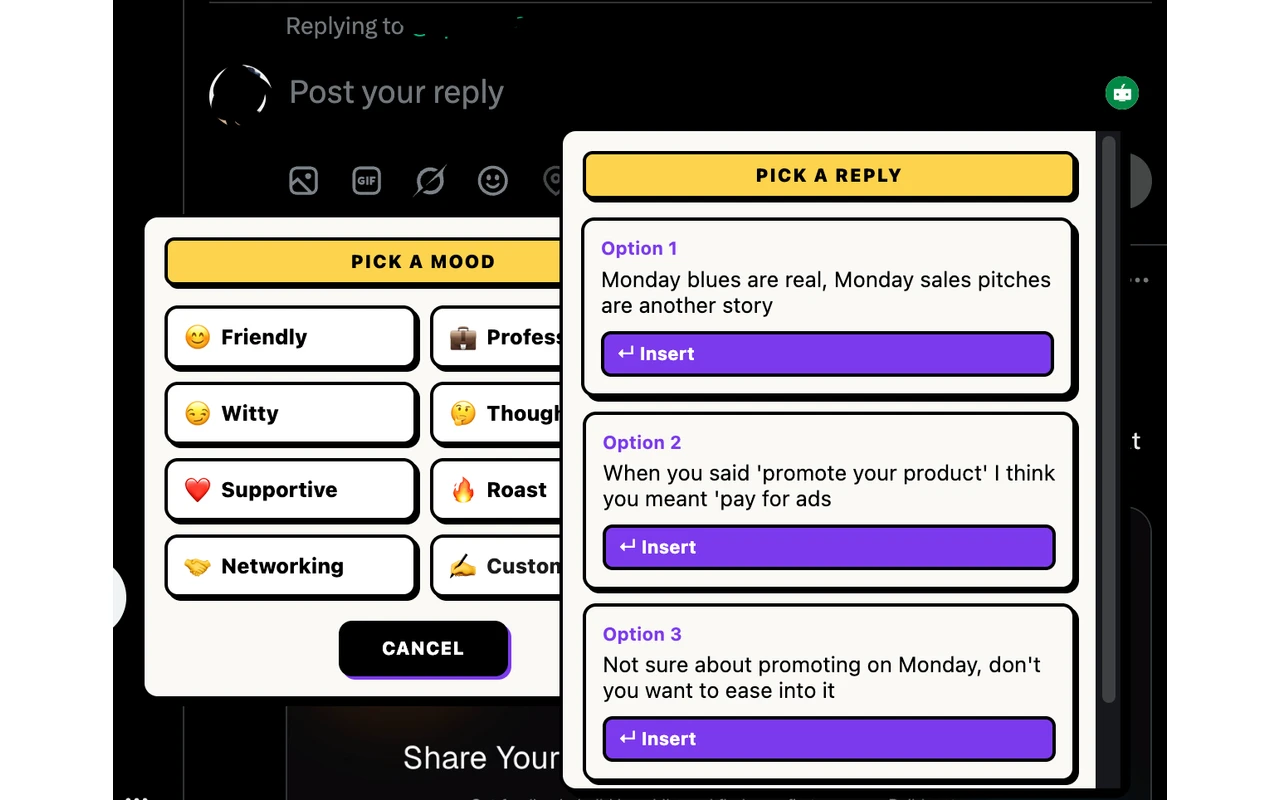 Human-reviewed drafting inside the social composer. No auto-posting.
 By Shuvo Anirban Roy, Voxily founder · Last verified:
Written by the maker of Voxily. Setup and plan details checked against product source.
Illustrative example. Review the actual draft before posting.
We get signups, but people stop during onboarding. What would you change first?
I’d check where people stop before changing the headline. What’s the first step they need to finish to see value?
Both plans include the eight standard moods, core drafting, history, and ratings.
| Feature | Free | Pro |
|---|---|---|
| Replies | 10 per day | Higher usage allowances |
| Personas / knowledge entries | 1 persona / 5 entries | Unlimited personas and entries |
| Post generations | 3 per day | Higher usage allowances |
| Chat requests / rewrites | 10 each per day | Higher usage allowances |
| Voice or import analyses | 3 per day | Higher usage allowances |
| Conversation length | 3 user messages per chat | No three-message limit |
| Fix My Reply | Included; uses reply allowance | Included; uses reply allowance |
| Three reply variations, Custom Mood, Brand Mode, DM drafts | Locked; opens pricing | Included; variations optional |
See a real selected draft and the maker’s edit in X. The capture uses Pro; you can test insertion and editing with one draft on Free.
Here's how Voxily handles this workflow, and what you can check yourself in the extension.
Read the post first, then open its reply composer. Voxily drafts there using the visible conversation and your saved writing context. You can check the suggestion against the post without moving between a separate chat app and X.
Voxily may fit if you already join conversations about your market but spend time starting or rewriting replies. Choose threads where you have something relevant to add. If you only write an occasional reply, writing it yourself may be simpler.
Free includes 10 reply generations per day, one persona and five knowledge entries. Install in desktop Chrome and sign in; no credit card or AI API key is required. Keep a draft only when it adds to the conversation and represents what you mean.
Voxily drafts. You review, edit, and post the final text.
Install Voxily in desktop Chrome, refresh X and sign in. Open a reply composer on a post you have read and can contribute to. Writing-example onboarding has a Skip for now option for a first test.
Select Friendly, Witty, Funny, Roast, Thoughtful, Professional, Supportive, or Networking. On Pro, enable 3 Reply Variations to compare three labeled angles.
Voxily uses thread context and your persona to draft a reply (or three labeled variations when enabled on Pro), or open Voxily Chat to shape the reply through conversation.
Insert puts the draft into the X reply box. Check the context, remove unsupported claims and edit the wording. Use X’s Reply button only if you want to publish it; you can also clear the draft.
Quick answers before you install.
Voxily Free includes 10 reply generations per day, one persona, five knowledge entries and eight standard moods. You need a Voxily account, but no credit card or personal AI API key.
Voxily is a desktop Chrome extension. This workflow runs on the X website in desktop Chrome, not inside the X iPhone or Android app.
You must sign in, but writing-example onboarding has a Skip for now option. Add your role, writing examples and relevant knowledge when you want to guide later drafts more closely.
No. Voxily is not an engagement bot. It helps with reply drafting, but you still choose which threads to join, review the draft, and post manually.
Yes. Brand Mode (Pro) adds product context, and a person still reviews and posts every reply.
Yes. Use a persona that reflects how you write, then review each draft before posting.
There is no guaranteed follower, lead or sales result. A drafting tool cannot choose a relevant audience or make a generic reply useful. Judge your trial by whether the edited reply expresses your point and is worth sending.
Funny leans into observational humor and self-aware lines. Witty is sharper and more concise. Roast is playful banter with a teasing edge. You can switch moods in one click and compare the angles before sending.
It overlaps on AI social writing, but Voxily focuses on in-composer human-reviewed replies across X/Twitter, LinkedIn, and Reddit, with chat-driven post creation built in and DM drafts on Pro.
Start with one real reply on X/Twitter, LinkedIn, or Reddit. Keep the draft only if it sounds like something you would actually post.
 Install free