
Voxily vs Tweet Hunter

Tweet Hunter Alternative for Reply Drafting on X (2026)

Tweet Hunter describes itself as an all-in-one X growth tool with writing, scheduling, automation, analytics and a CRM. Voxily drafts replies inside X, LinkedIn, Threads, Reddit and Facebook, and offers post drafts and personal follow-ups. You edit and publish the text yourself.

Free plan · No credit card · Desktop Chrome · Sign-in required

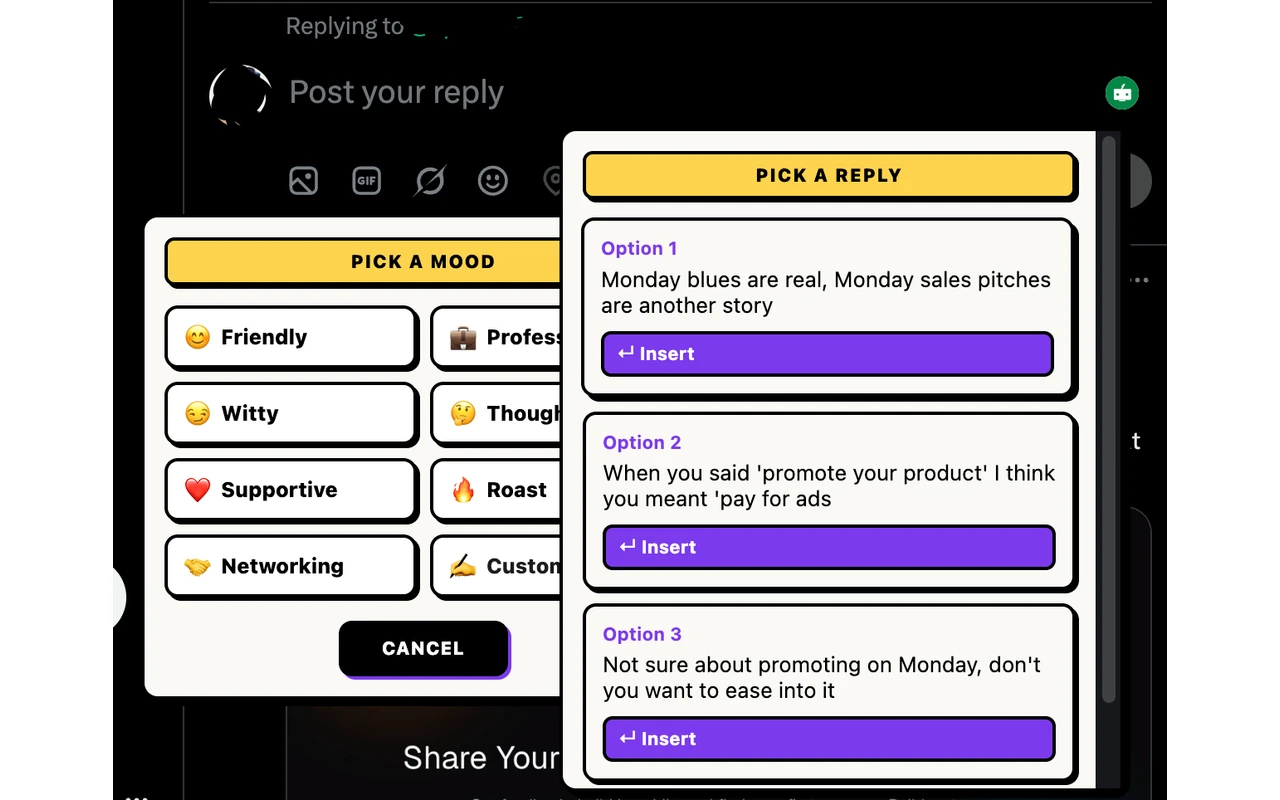
Voxily X reply drafting interface Human-reviewed drafting inside the social composer. No auto-posting.

By Shuvo Anirban Roy, Voxily founder · Last verified:

Written by the maker of Voxily. Competitor facts are linked below; this is not an independent review.

Compare

Which workflow fits you?

Tweet Hunter here means tweethunter.io and its Chrome extension, Tweet Hunter X: Sidebar for X. The comparison draws from Tweet Hunter’s homepage, pricing and extension listing. The public pages describe its editor, scheduled publishing and CRM.

Voxily and Tweet Hunter: workflow and plan comparison
CriterionVoxilyTweet Hunter
PlatformsX (Twitter), LinkedIn, Threads, Reddit and Facebook in desktop Chrome. Threads and Facebook ask for site access the first time you turn them on.X. Its homepage calls it an all-in-one X (formerly Twitter) growth tool.
Where the draft appearsInside the reply box on the post you are reading. Post drafts are written in the Voxily side panel.In its own writing and scheduling tools. Its Chrome extension, a sidebar for X, offers an AI writing assistant to subscribers. Where AI reply drafts appear is not stated on their site.
Voice inputsA persona with tone, role, expertise and 2 to 5 of your own posts as writing examples, plus saved knowledge entries and moods: Friendly and Professional on Free, all eight plus Custom Mood on Pro.Its homepage lists daily personalized tweet suggestions. Enterprise lists “Custom trained AI” and “Smart AI reply generation”. What it uses to match your voice is not stated on their site.
Who postsYou. Voxily inserts the draft; you edit it and click the platform's own reply button. It never posts or schedules anything for you.Scheduled tweets and threads post at the time you set. Listed automations include Auto DM, Auto Plug, Evergreen tweets and Auto Retweet.
Free planThe listed plan includes 3 AI replies per day, including Fix My Reply, and one post creation request per day for up to five platform drafts. Friendly and Professional moods, one persona and five knowledge entries. Sign in without a credit card or personal AI API key.No free plan is listed on its pricing page. Each plan has a 7-day free trial, and its homepage FAQ describes a 30-day refund policy.
Paid pricePro is $12.99/month or $120/year.Monthly billing: Discover $29 and Grow $49 per month; the Enterprise card shows both $199 and $200. Check the annual rates and total before subscribing.
What else it includes$12.99/month or $120/year. Pro includes unlimited replies and post drafts within fair use, unlimited personas and knowledge entries, all eight moods and custom tones, Brand Mode, DM drafts, three reply variations when enabled, Feed Queue with up to five drafts at once, and Follow-Up Tracker.A viral tweet library, an AI writer (Grow and up), scheduling, automations, X analytics, an X CRM (Grow and up), 1, 5 or unlimited X accounts by plan, and a ghostwriting mode (Enterprise).

Sources: Tweet Hunter homepage and FAQTweet Hunter pricingTweet Hunter X: Sidebar for X on the Chrome Web StoreVoxily plans

Free or Pro

Start free. Upgrade when you need more.

Both plans include all five platforms, the Post Creator, Fix My Reply, duplicate-reply alerts, history and ratings. Free uses the Friendly and Professional moods. These are the Free allowances listed for Voxily 1.0.30. Check the extension for the daily limits in effect on your account.

Voxily plan differences
FeatureFreePro
Replies3 per dayUnlimited (fair use)
Post drafts1 per day (all platforms at once)Unlimited (fair use)
Chat3 requests per day, 3 messages per chatUnlimited (fair use)
Rewrites3 per dayUnlimited (fair use)
Voice checks (voice or import analyses and voice previews)3 per dayUnlimited (fair use)
MoodsFriendly, ProfessionalAll 8 + custom
Personas / knowledge entries1 persona / 5 entriesUnlimited personas and entries
Fix My ReplyIncluded; uses reply allowanceIncluded; uses reply allowance
Duplicate-reply alertsIncludedIncluded
Feed Queue, Follow-Up TrackerLocked; opens upgradeIncluded
Three reply variations, Custom Mood, Brand Mode, DM draftsLocked; opens upgradeIncluded
Use case

Why Voxily fits this workflow.

Here's how Voxily handles this workflow, and what you can check yourself in the extension.

Which one fits

Both tools can help draft for X. Tweet Hunter also schedules posts and tracks their performance.

  • Choose Tweet Hunter if you plan and schedule X posts, track X analytics, run automations or keep lists of X accounts in a CRM.
  • Choose Voxily if your X work is mostly replies you write yourself, or if you also reply on LinkedIn, Threads, Reddit or Facebook.
  • Some people may want both: one for planning and analytics, one for drafting in the reply box. Check that the overlap is worth paying for.

What Tweet Hunter does that Voxily does not

Its pages list tweet and thread scheduling, a searchable library of viral tweets, X analytics such as daily follower growth, automations including Auto DM, and an X CRM for lists of accounts. Grow and Enterprise cover several X accounts, and Enterprise adds a ghostwriting mode. If you use a content calendar or X analytics today, keep those in your publishing workflow.

What Voxily does differently

Voxily drafts inside the reply box on X, LinkedIn, Threads, Reddit and Facebook, from a persona built on your own writing examples. Post Creator also drafts five versions from one idea. You review the text and click the platform's own reply button. Tweet Hunter's pages describe X only and list scheduled posting and automations, and its pricing page lists no free plan.

Workflow

Draft, review and send a reply.

Voxily drafts. You review, edit, and post the final text.

01

Pick a reply you would write anyway

Open a post on X where you have a specific point, question or detail to add.

02

Try Free first

Install Voxily in desktop Chrome, sign in and add one persona with a few of your own posts. No card is required.

03

Edit before you post

Generate a draft in the reply box, cut anything you cannot back up and add your own detail. Then post it yourself.

04

Keep what fits

If you rely on Tweet Hunter for scheduling or analytics, keep it. Voxily does not import Tweet Hunter data or replace those features.

FAQ

Common questions.

Quick answers before you install.

Is Voxily a full Tweet Hunter replacement?

No. Voxily drafts replies, posts and, on Pro, DMs that you review and send yourself. Pro includes Follow-Up Tracker for replies you insert. Tweet Hunter is the option here for scheduling and social analytics.

Does Voxily work outside X?

Yes. It drafts replies in the reply box on X, LinkedIn, Threads, Reddit and Facebook. Tweet Hunter's homepage describes it as an X growth tool.

Does Tweet Hunter have a free plan?

Its pricing page lists three paid plans, each with a 7-day free trial, and no permanent free plan. Voxily Free includes 3 AI replies a day, one persona and five knowledge entries, with no card.

What does Voxily Pro cost?

$12.99/month or $120/year. Pro includes unlimited replies and post drafts within fair use, unlimited personas and knowledge entries, all eight moods and custom tones, Brand Mode, DM drafts, three reply variations when enabled, Feed Queue with up to five drafts at once, and Follow-Up Tracker.

Install Voxily and try it in one real thread.

Start with one real reply on X, LinkedIn, Threads, Reddit or Facebook. Keep the draft only if it sounds like something you would actually post.

Install free

Explore related workflows