
Voxily vs XreplyAI

Voxily vs XreplyAI

Voxily drafts replies you send yourself in the Chrome composer on five social platforms. XreplyAI’s current public pages focus on a broader publishing service and shared review queue. Its earlier Chrome extension and current prices deserve a separate check.

Free plan · No credit card · Desktop Chrome · Sign-in required

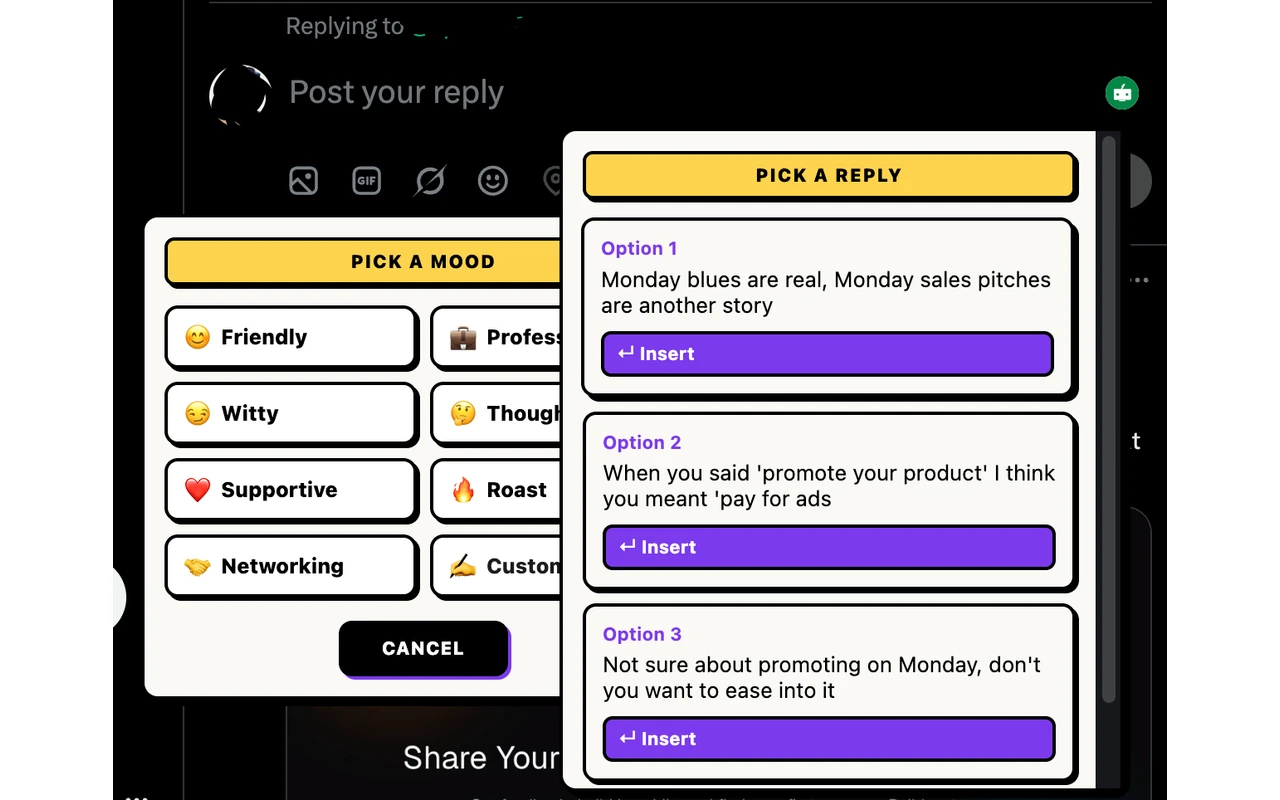
Voxily reply drafting interface Human-reviewed drafting inside the social composer. No auto-posting.

By Shuvo Anirban Roy, Voxily founder · Last verified:

Written by the maker of Voxily. Competitor facts are linked below; this is not an independent review.

Compare

Which workflow fits you?

XreplyAI’s homepage and pricing page were checked November 20, 2026. Its former extension page redirects to the homepage, and the previous Chrome Web Store URL did not show an install listing on this check. The earlier extension details are historical.

Voxily and XreplyAI: workflow and plan comparison
CriterionVoxilyXreplyAI
Reply platformsX (Twitter), LinkedIn, Threads, Reddit and Facebook in desktop Chrome. Threads and Facebook ask for site access the first time you turn them on.The earlier extension listing showed X, LinkedIn, Instagram and Reddit. Current browser extension access is unverified.
Draft locationA selected draft can be inserted into the native reply box for editing.The earlier extension listing described inline drafts. The current paid service describes a shared review queue.
Writing contextSaved persona, writing examples and relevant knowledge entries; Friendly and Professional moods on Free, all eight plus custom on Pro.The current service describes voice matching based on your brand materials and social presence.
Publishing workflowYou review, edit and send. No automatic publishing or scheduling.The wider service offers publishing after approval and automated DM replies. Its pricing page also describes optional automatic posting.
Free accessThe listed plan includes 3 AI replies per day, including Fix My Reply, and one post creation request per day for up to five platform drafts. Friendly and Professional moods, one persona and five knowledge entries. Sign in without a credit card or personal AI API key.Its pricing page advertises a 14-day trial for the wider service and requires a card.
Listed paid pricePro is $12.99/month or $120/year.The homepage advertised $599/month after the trial. The pricing page advertised $1,299/month. Both describe a broader social-media service. Confirm the billed rate before starting a trial.
Additional tools$12.99/month or $120/year. Pro includes unlimited replies and post drafts within fair use, unlimited personas and knowledge entries, all eight moods and custom tones, Brand Mode, DM drafts, three reply variations when enabled, Feed Queue with up to five drafts at once, and Follow-Up Tracker.The pricing page lists a shared review queue, comment replies, automated DM replies and publishing across ten platforms.

Sources: XreplyAI terms describing its extensionXreplyAI service overviewXreplyAI pricingVoxily plansVoxily first-use checklist

Free or Pro

Start free. Upgrade when you need more.

Both plans include all five platforms, the Post Creator, Fix My Reply, duplicate-reply alerts, history and ratings. Free uses the Friendly and Professional moods. These are the Free allowances listed for Voxily 1.0.30. Check the extension for the daily limits in effect on your account.

Voxily plan differences
FeatureFreePro
Replies3 per dayUnlimited (fair use)
Post drafts1 per day (all platforms at once)Unlimited (fair use)
Chat3 requests per day, 3 messages per chatUnlimited (fair use)
Rewrites3 per dayUnlimited (fair use)
Voice checks (voice or import analyses and voice previews)3 per dayUnlimited (fair use)
MoodsFriendly, ProfessionalAll 8 + custom
Personas / knowledge entries1 persona / 5 entriesUnlimited personas and entries
Fix My ReplyIncluded; uses reply allowanceIncluded; uses reply allowance
Duplicate-reply alertsIncludedIncluded
Feed Queue, Follow-Up TrackerLocked; opens upgradeIncluded
Three reply variations, Custom Mood, Brand Mode, DM draftsLocked; opens upgradeIncluded
Use case

Why Voxily fits this workflow.

Here's how Voxily handles this workflow, and what you can check yourself in the extension.

Choose by the work you want to do

If you want to draft a reply to a conversation you already chose, try that exact task in each product. If your main need is managing a publishing calendar or a team approval process, assess those capabilities separately.

  • Try Voxily Free if you want manual reply drafting on X, LinkedIn, Threads, Reddit or Facebook before committing to a subscription.
  • Consider XreplyAI if you need a managed publishing workflow with a shared review queue. Check availability with XreplyAI if you are looking for its former Chrome reply workflow.
  • Keep your current tool if its drafts already fit your intent and the editing effort is acceptable.

Personal voice is a claim to test

Both vendors describe using existing material to guide drafts. An input method does not establish output quality. Compare the same thread and intended point: does the draft answer the actual question, avoid unsupported first-person claims, and need fewer edits than your current approach?

What this comparison does not prove

This is a maker-written comparison of documented workflows and listed plans. It is not a customer study or a hands-on XreplyAI review. We have not verified its checkout, measured time savings, or tested whether either product improves engagement. Platform policies still apply to browser extensions and account activity.

Workflow

Draft, review and send a reply.

Voxily drafts. You review, edit, and post the final text.

01

Pick a real conversation

Choose a public thread where you have a point to add. Write that intended point down before looking at generated text.

02

Provide your own writing

Use real writing examples you are permitted to share. Avoid confidential details and private conversations.

03

Compare draft and edits

Check context, facts and voice before inserting anything. Record what needed changing; a generated card alone is not a useful result.

04

Decide from repeat use

Try another task later. Buy a paid plan only if a recurring benefit or capability justifies it for you.

FAQ

Common questions.

Quick answers before you install.

Is Voxily an XreplyAI alternative?

Voxily is an alternative for manual reply drafting on X, LinkedIn, Threads, Reddit and Facebook. It does not replace the broader publishing calendar, team workflow or API service described by XreplyAI.

Does Voxily support Instagram replies?

Voxily’s five reply platforms are X, LinkedIn, Threads, Reddit and Facebook. XreplyAI’s earlier extension listed Instagram. Current extension access remains unverified.

Does Voxily need my AI API key?

Voxily includes hosted AI. Sign in with a Voxily account to start drafting.

Which one matches my voice better?

This comparison does not establish a quality winner. Try the same thread with your own writing examples, compare the drafts, and check factual accuracy and editing effort.

Does Voxily automatically send replies?

No. Voxily drafts text. You review, edit and send the reply yourself.

Install Voxily and try it in one real thread.

Start with one real reply on X, LinkedIn, Threads, Reddit or Facebook. Keep the draft only if it sounds like something you would actually post.

Install free

Explore related workflows