Voxily vs Buffer

Reply drafting or a social inbox?

Voxily drafts beside the conversation you are reading on X, LinkedIn or Reddit. Buffer combines publishing with a Community inbox for comments on connected accounts. Both offer AI replies; choose by where you want to work and whether you also need a publishing queue.

Free plan · No credit card · Desktop Chrome · Sign-in required

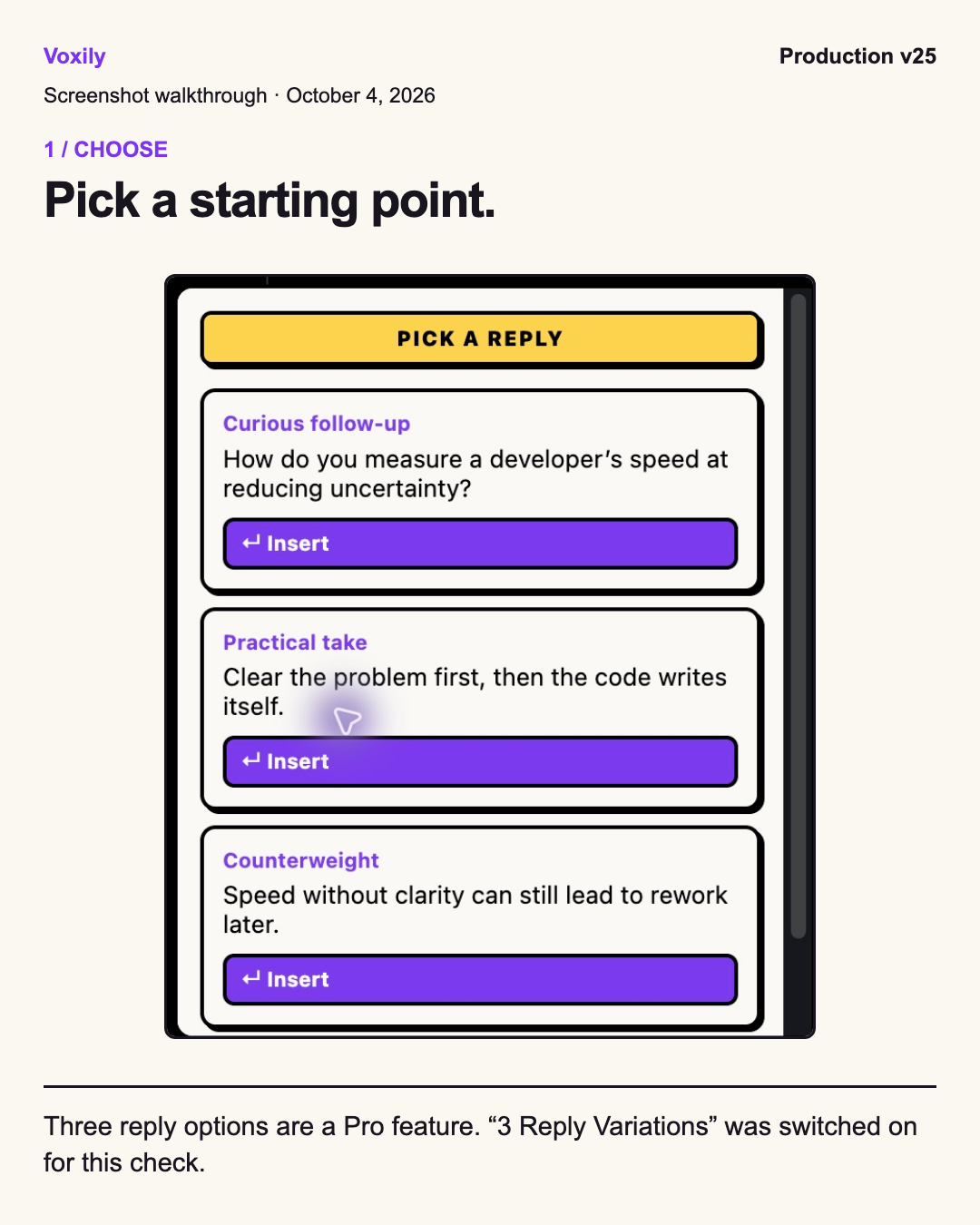
Production v25 X reply picker, Pro variations enabled; labeled screenshot walkthrough from October 4, 2026 Human-reviewed drafting inside the social composer. No auto-posting.

By Shuvo Anirban Roy, Voxily founder · Last verified:

Written by the maker of Voxily. Competitor facts are linked below; this is not an independent review.

Compare

Which workflow fits you?

This page compares buffer.com with Voxily using official sources checked October 4, 2026. We have not tested a Buffer account. Channel-specific restrictions and output quality are not independently verified. Buffer is a trademark of its owner; Voxily is not affiliated with Buffer.

Voxily and Buffer: workflow and plan comparison
CriterionVoxilyBuffer
Reply workflowGenerate a reply from the visible conversation, insert the draft into the native comment box, edit it and use the platform posting button yourself.Community collects comments on connected accounts. Reply in Buffer or click through to the platform; AI suggestions and saved replies are available.
PlatformsX, LinkedIn and Reddit in desktop Chrome.Community lists Instagram, Facebook, LinkedIn, Threads, Bluesky, X, TikTok, Google Business Profile, YouTube and Mastodon. Reddit is not listed. Support varies by account type.
Free plan10 reply generations per day, one persona, five knowledge entries and eight standard moods. Sign-in required; no card or personal AI-provider key.Three connected channels, one user, ten queued posts per channel and 100 ideas. Community includes five AI reply suggestions per week and one saved reply.
Paid pricing$12.99/month or $120/year. Higher allowances, unlimited personas and knowledge entries, Custom Mood, Brand Mode and optional three reply variations.For one channel: Essentials $6/month or $60/year; Team $12/month or $120/year. Annual equivalents are $5 or $10 per month. Rates change with channel count.
Writing inputsSaved personas, your writing examples, moods and a knowledge base you control. Pro Brand Mode adds saved product context.AI Assistant for creating and refining content; Community AI reply suggestions and saved replies. These are separate features with different Free allowances.
Publishing and teamsManual posting. No scheduler, shared approval queue or social performance dashboard.Publishing calendar, queued posts and analytics. Team adds unlimited members, approvals and access controls.

Sources: Buffer pricing and plan limitsBuffer official machine-readable pricingBuffer Community workflow and platformsVoxily Free and Pro plans

Free or Pro

Start free. Upgrade when you need more.

Both plans include the eight standard moods, core drafting, history, and ratings.

Voxily plan differences
FeatureFreePro
Replies10 per dayHigher usage allowances
Personas / knowledge entries1 persona / 5 entriesUnlimited personas and entries
Post generations3 per dayHigher usage allowances
Chat requests / rewrites10 each per dayHigher usage allowances
Voice or import analyses3 per dayHigher usage allowances
Conversation length3 user messages per chatNo three-message limit
Fix My ReplyIncluded; uses reply allowanceIncluded; uses reply allowance
Three reply variations, Custom Mood, Brand Mode, DM draftsLocked; opens pricingIncluded; variations optional
Use case

Why Voxily fits this workflow.

Here's how Voxily handles this workflow, and what you can check yourself in the extension.

Start with the conversation you want to handle

If you want to contribute to a founder's post while reading the feed, Voxily keeps the draft beside that post. If your main task is keeping up with comments on your connected accounts, Buffer Community offers a central inbox. Neither workflow removes the need to read the comment and check your answer.

Count channels before comparing subscription prices

A Buffer channel is a connected social account. At the current one-to-ten-channel rates, three Essentials channels cost $18/month or $180/year; three Team channels cost $36/month or $360/year. These totals are calculated from the official rates. Voxily Pro is a personal drafting subscription rather than a charge per connected account.

Keep a publishing tool if you need one

Voxily has no Buffer queue or analytics import. You can keep your publishing schedule in Buffer and try a Free Voxily reply on a conversation outside that schedule. There is no need to move your stored posts to test insertion.

Workflow

Draft, review and send a reply.

Voxily drafts. You review, edit, and post the final text.

01

Choose one reply

Read the post and decide what you can add. Use your own facts and avoid claiming results or experience you have not supplied.

02

Insert and edit

Generate in Voxily, choose a draft and insert it into the reply box. Edit it there. On Pro, three options appear only when the setting is enabled.

03

Decide whether to post

Keep, change or discard the draft. You click the social platform posting button; Voxily does not schedule or send it.

FAQ

Common questions.

Quick answers before you install.

Does Buffer offer AI replies?

Yes. Its Community feature includes AI reply suggestions. The current Free allowance is five suggestions per week; paid plans list unlimited suggestions.

Check Buffer pricing

Are Buffer's ten Free posts a monthly limit?

No. They are queue slots per channel. A slot becomes available again when a scheduled post is published. That is a different unit from Voxily's ten reply generations per day.

Which product should I use for team publishing?

Buffer is the closer fit for a calendar, approvals and team account access. Voxily focuses on personal drafting in the conversation and has no shared publishing queue.

Can I use Voxily without paying?

Yes. Free includes one reply draft per generation, eight moods, one persona and five knowledge entries. Pro-only controls open pricing when clicked on Free.

Install Voxily and try it in one real thread.

Start with one real reply on X/Twitter, LinkedIn, or Reddit. Keep the draft only if it sounds like something you would actually post.

Install free

Explore related workflows