
Voxily vs Hootsuite

Voxily vs Hootsuite for social replies and publishing

Voxily helps you draft a reply while reading a post in Chrome and keep track of conversations you want to revisit. Hootsuite brings incoming messages from connected accounts into a social inbox and gives teams tools to assign work, schedule posts and report on performance.

Free plan · No credit card · Desktop Chrome · Sign-in required

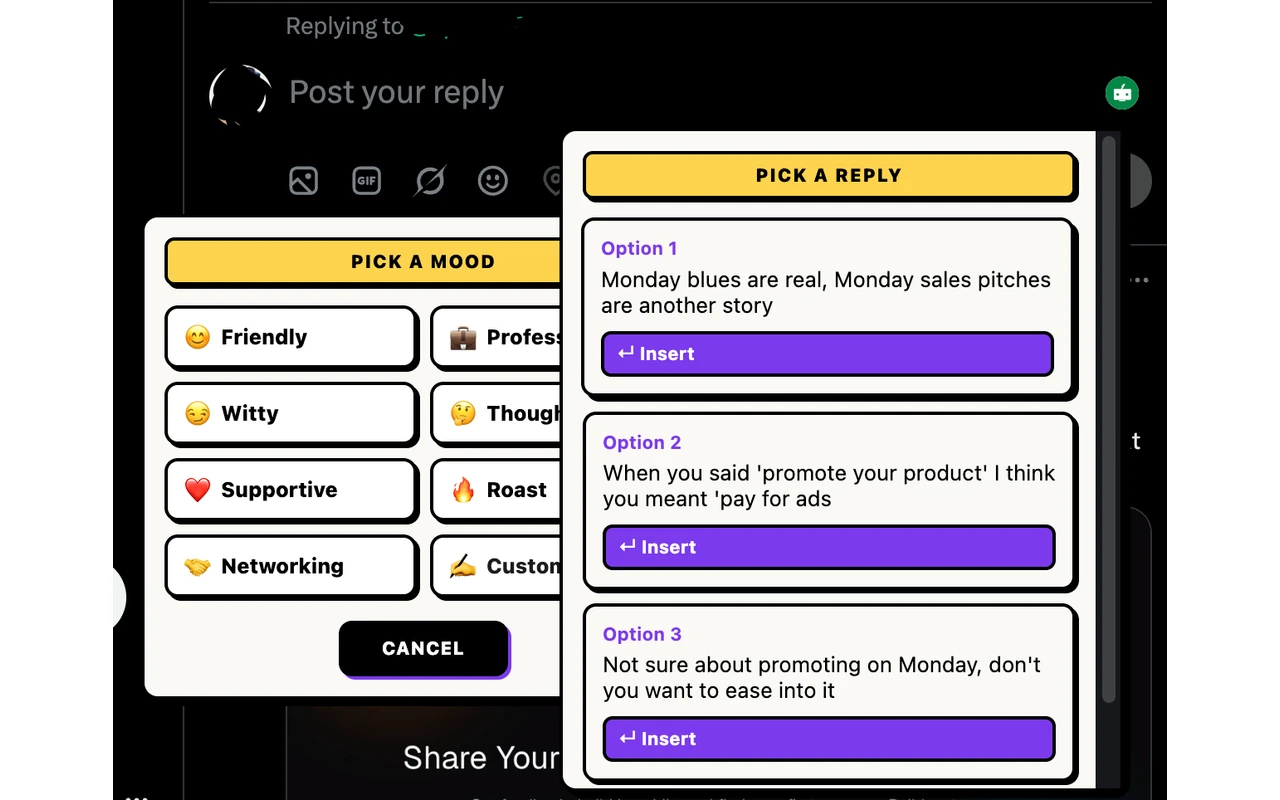
Voxily reply drafting controls below an X post Voxily drafting in the X reply composer.

By Shuvo Anirban Roy, Voxily founder · Last verified:

Written by the maker of Voxily. Competitor facts are linked below; this is not an independent review.

Compare

Which workflow fits you?

Hootsuite features and advertised US prices were checked against its public plans and help pages on November 20, 2026. The comparison covers documented workflows and plan terms. Pricing is before tax.

Voxily and Hootsuite: workflow and plan comparison
CriterionVoxilyHootsuite
Where you startDraft from the visible conversation, insert the selected text into the native reply box, edit it and send it yourself.Open an incoming comment, message or mention from a connected account in Nest, Hootsuite’s social inbox. The available message types depend on the network.
Account coverageX (Twitter), LinkedIn, Threads, Reddit and Facebook in desktop Chrome. Threads and Facebook ask for site access the first time you turn them on.Inbox supports LinkedIn Pages, public Threads comments, X and selected Facebook conversations. Reddit includes posts and comments in connected subreddits and replies to your comments. Other channels are listed in the Inbox guide.
AI reply draftsGenerate from the post and your saved persona, writing examples and relevant knowledge. Pro can prepare up to five drafts at once from visible feed posts.The plans table lists AI-powered Smart Replies on Professional, Advanced and Enterprise. The separate Wisdom assistant helps teams draft posts.
Handoffs and follow-upFollow-Up Tracker on Pro lets you revisit replies you inserted and mark which conversations need a follow-up.Inbox shows new, pending and resolved conversations. Advanced and Enterprise include teammate assignment and skill-based routing.
PublishingTurn one idea into drafts for up to five platforms in Post Creator. Review and manually publish each version you choose to use.Perch includes a publishing calendar, scheduling and network-specific edits. The plans table lists content approvals on Advanced and Enterprise.
Free accessThe listed plan includes 3 AI replies per day, including Fix My Reply, and one post creation request per day for up to five platform drafts. Friendly and Professional moods, one persona and five knowledge entries. Sign in without a credit card or personal AI API key.Hootsuite advertises a 14-day trial on Standard, Professional and Advanced. The public plans page lists paid subscriptions after the trial.
Paid pricingPro is $12.99/month or $120/year.Standard $99, Professional $199 and Advanced $399 per user per month at annual billing rates. Enterprise has custom pricing.

Sources: Hootsuite plans, annual rates and feature tableHootsuite Nest Inbox supported channels and message typesHootsuite Standard and Professional Inbox guideHootsuite publishing calendar guideVoxily Free and Pro plans

Free or Pro

Start free. Upgrade when you need more.

Both plans include all five platforms, the Post Creator, Fix My Reply, duplicate-reply alerts, history and ratings. Free uses the Friendly and Professional moods. These are the Free allowances listed for Voxily 1.0.30. Check the extension for the daily limits in effect on your account.

Voxily plan differences
FeatureFreePro
Replies3 per dayUnlimited (fair use)
Post drafts1 per day (all platforms at once)Unlimited (fair use)
Chat3 requests per day, 3 messages per chatUnlimited (fair use)
Rewrites3 per dayUnlimited (fair use)
Voice checks (voice or import analyses and voice previews)3 per dayUnlimited (fair use)
MoodsFriendly, ProfessionalAll 8 + custom
Personas / knowledge entries1 persona / 5 entriesUnlimited personas and entries
Fix My ReplyIncluded; uses reply allowanceIncluded; uses reply allowance
Duplicate-reply alertsIncludedIncluded
Feed Queue, Follow-Up TrackerLocked; opens upgradeIncluded
Three reply variations, Custom Mood, Brand Mode, DM draftsLocked; opens upgradeIncluded
Use case

Why Voxily fits this workflow.

Here's how Voxily handles this workflow, and what you can check yourself in the extension.

When a conversation needs an owner

A customer asks about delivery in a Facebook Page comment while a second agent handles private messages. With Hootsuite Advanced, the team can route the thread, add an internal note and see when it is resolved. If agents work in shifts, test whether the next person has enough context to pick up the request. Check both the account type and whether the thread enters Inbox before buying.

When you want to return to a discussion

If you are reading a LinkedIn post and want to answer a specific point, use Voxily in the comment box. After inserting a reply, mark the conversation for follow-up if you want to revisit it. Pro can draft your next reply using the saved context. During a feed session, Feed Queue can prepare up to five drafts from posts already visible on the page.

When a draft needs an approval and a date

A team preparing next week’s launch posts can use Hootsuite to schedule each account’s version and route it through a content approval on eligible plans. An individual who needs wording for the same launch can use Voxily Post Creator to generate five platform drafts from one idea and publish the selected drafts manually.

Workflow

Draft, review and send a reply.

Voxily drafts. You review, edit, and post the final text.

01

Choose a real example

Pick an incoming conversation a teammate may need to take over or a public discussion you want to join yourself.

02

Check the handoff

For an inbox trial, connect the exact account type you expect to manage and check that a teammate can see and take responsibility for the thread on the plan you’re evaluating.

03

Check the draft in context

For a Chrome trial, generate a Free Voxily reply on a supported site. Read it in the composer, add the detail you want to contribute and send it yourself when ready.

FAQ

Common questions.

Quick answers before you install.

Does Hootsuite Inbox support Reddit?

Yes. Hootsuite lists comments and posts in connected subreddits and replies to your Reddit comments. Its help page also says Reddit in Inbox is web-only and replies use the Reddit account connected to the organization.

Check the Hootsuite Inbox guide

Does Voxily offer a shared inbox?

Follow-Up Tracker shows the drafts you inserted and the follow-up status you set. If several people need to assign or resolve inbound messages together, compare Hootsuite’s Inbox plans.

See how Follow-Up Tracker works

How much does Hootsuite cost for two agents who need assignments?

At the published US annual-billing rate for Advanced, two seats cost $9,576 a year before tax. That is $399 × 2 seats × 12 months. Check which plan covers your accounts and confirm the billed total on the plans page.

See Hootsuite plans

Can I keep Hootsuite for publishing and use Voxily for replies?

Yes. Keep the Hootsuite calendar for scheduled content. Open a supported social site in desktop Chrome when you want to draft a reply with Voxily and send it yourself.

Install Voxily and try it in one real thread.

Start with one real reply on X, LinkedIn, Threads, Reddit or Facebook. Keep the draft only if it sounds like something you would actually post.

Install free

Explore related workflows