AI reply Chrome extension

An AI reply & comment generator Chrome extension you still control.

Voxily is an AI reply and comment generator for desktop Chrome on X, LinkedIn and Reddit. Your writing examples guide the draft; you review, edit and send it yourself. Free includes 10 replies a day, with sign-in required and no credit card.

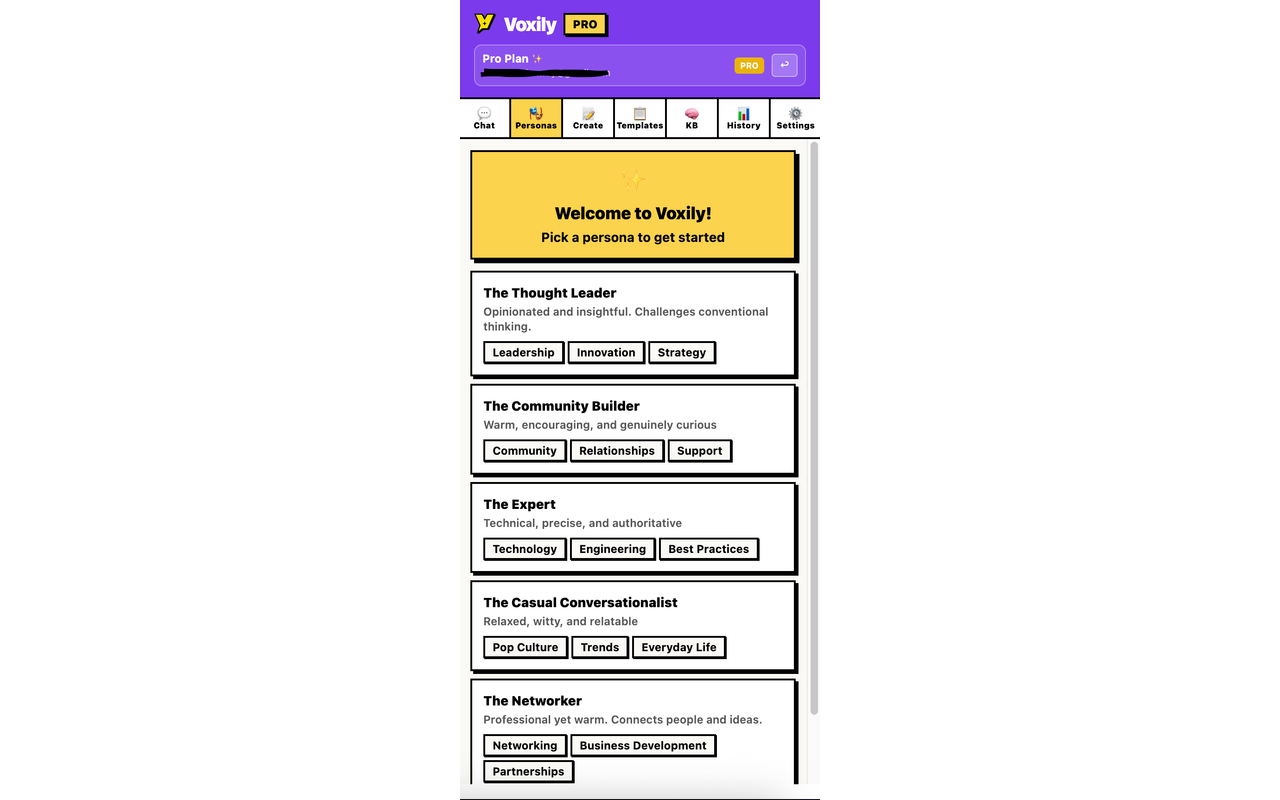
Voxily persona and knowledge base setup Human-reviewed drafting inside the social composer. No auto-posting.
Use case

Why Voxily fits this workflow.

Here's how Voxily handles this workflow, and what you can check yourself in the extension.

What is Voxily?

Voxily is an AI reply and comment generator for desktop Chrome. It drafts inside the reply box on X (Twitter), LinkedIn and Reddit, using your saved persona, writing examples and relevant knowledge. You review, edit and send the reply yourself. It does not automatically post or send messages.

Is Voxily free, and what does Pro cost?

Free includes 10 AI replies a day, one persona and five knowledge entries. An account is required; a credit card and your own AI API key are not. Pro costs $12.99 a month or $120 a year and adds three reply variations when enabled, Custom Mood, Brand Mode, DM drafts and expanded usage.

One extension, three platforms

Voxily is built for the daily reply loop across X/Twitter, LinkedIn, and Reddit. It appears where you write and drafts from the visible conversation context.

  • Inline composer button on supported reply boxes
  • Personas, knowledge base, and Voxily Chat for replies and posts, plus DMs on Pro
  • Eight moods, with 3 labeled variations on Pro when enabled

Hosted AI, no key setup

Users do not need to configure their own AI provider key. Voxily routes generation through its backend and Groq, with usage caps and billing handled by the product.

  • No API key to buy or paste
  • Sign in with Google or email
  • Secure Pro checkout

Assisted drafting, not automation

Voxily is assisted drafting, not automation. It does not auto-post, auto-like, auto-follow, or send bulk messages.

Workflow

How to use it without risky automation.

Voxily drafts. You review, edit, and post the final text.

01

Install from Chrome

Use the live Chrome Web Store listing, sign in, and start with one real thread.

02

Set up your voice

Create a persona and knowledge base. Type it, paste a block of text, or upload a PDF, DOC, DOCX, MD, or TXT. Voxily extracts the text, shows an AI summary preview, and only stores the text.

03

Draft in the composer

Use Voxily on supported social pages to generate mood-aware replies or fix rough drafts. Voxily Chat helps you iterate on replies and posts; DM drafting is on Pro.

04

Upgrade when needed

Move to Pro when daily usage, 3 labeled variations, Brand Mode, DM Generator, and unlimited personas and knowledge entries become part of the workflow.

FAQ

Common questions.

Quick answers before you install.

What is Voxily?

Voxily is a Chrome extension that drafts AI replies and comments inside the reply box on X (Twitter), LinkedIn and Reddit. Saved personas, writing examples and knowledge guide the draft. You edit and send it yourself.

Does Voxily automatically post replies?

No. Voxily drafts text and can insert the selected draft into the composer. A person reviews, edits and clicks the platform’s send button.

What does Voxily Pro cost?

Voxily Pro costs $12.99 per month or $120 per year. Free includes 10 replies daily with no credit card. See the pricing section for current plan details.

Voxily pricing

Does manual posting guarantee my account will avoid restrictions?

No. Platform policies still apply to browser extensions and account activity. Voxily does not automatically publish or send messages; review platform rules and every draft before using it.

Privacy and platform safety

Which browsers does Voxily support?

Google Chrome, via the Chrome Web Store.

Does the extension work without signup?

No. You need a free account (Google or email) so usage, personas, and Pro status sync. No credit card required.

Does Voxily need broad permissions?

It needs access to supported social platforms so it can detect composers, read visible context, and place drafts where you are writing.

What is the free plan for?

Free includes 10 AI replies per day, 10 Voxily Chat messages per day (up to 3 per conversation), 1 persona, and 5 knowledge entries. Upgrade to Pro for unlimited usage and advanced features.

Install Voxily and try it in one real thread.

Start with one real reply on X/Twitter, LinkedIn, or Reddit. Keep the draft only if it sounds like something you would actually post.

Install free

Explore related workflows