
Voxily vs Typefully

Reply drafting or a publishing editor?

Voxily drafts replies beside the conversation on X, LinkedIn, Threads, Reddit and Facebook. Typefully combines a writing editor with scheduling and publishing. Both accept writing context. Choose Voxily for replies you review in the native composer; evaluate Typefully when your main task is preparing and publishing posts.

Free plan · No credit card · Desktop Chrome · Sign-in required

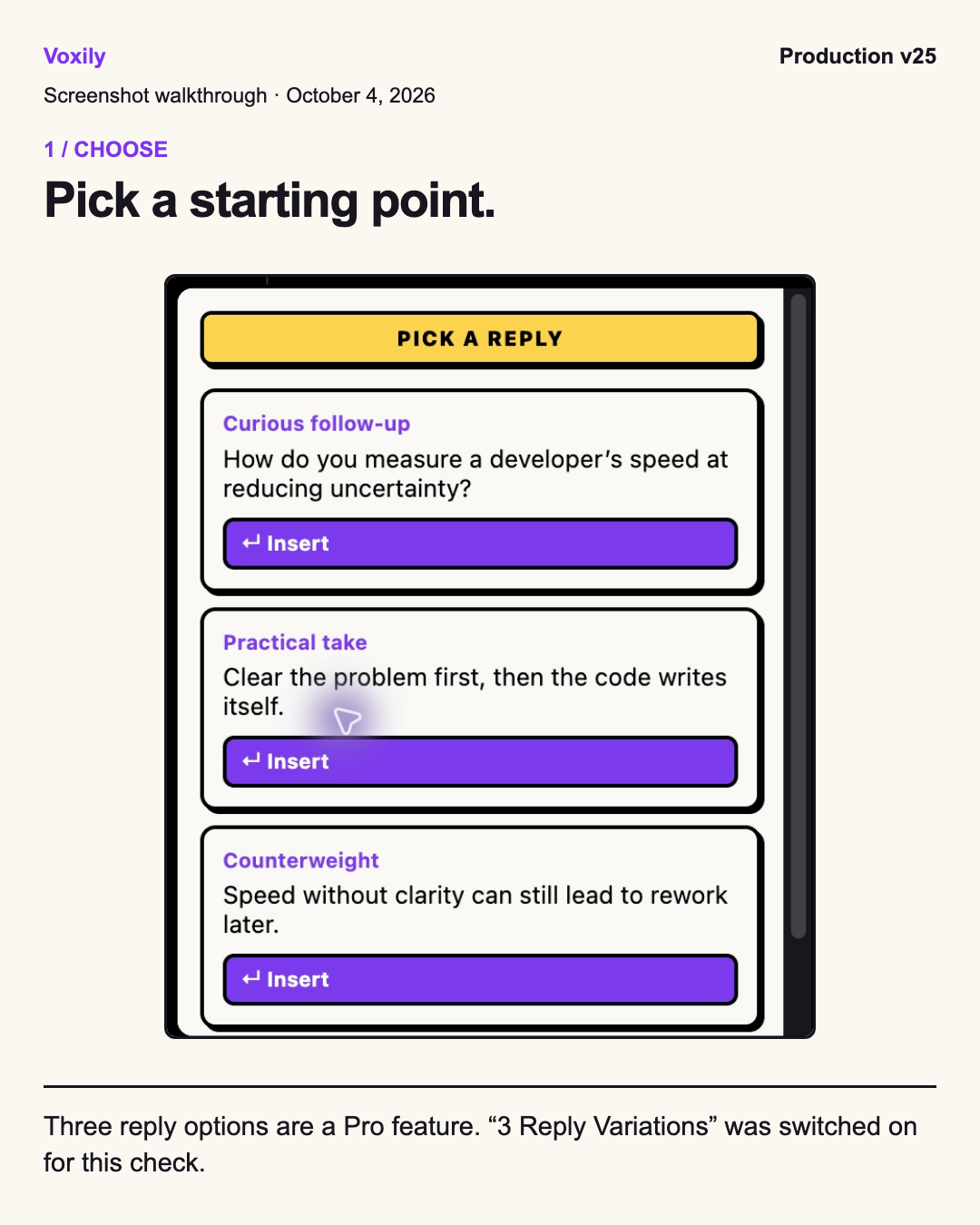
Voxily X reply picker with Pro variations enabled, captured October 4, 2026 Human-reviewed drafting inside the social composer. No auto-posting.

By Shuvo Anirban Roy, Voxily founder · Last verified:

Written by the maker of Voxily. Competitor facts are linked below; this is not an independent review.

Compare

Which workflow fits you?

Typefully’s public help center was checked November 20, 2026. The prices are from its October 6 pricing snapshot. Check the live plan offer before buying.

Voxily and Typefully: workflow and plan comparison
CriterionVoxilyTypefully
Where you draftDraft from the visible conversation, insert the selected text into the native reply box, edit it and send it yourself.Writing Assistant works inside the Typefully editor with the current draft.
PlatformsX (Twitter), LinkedIn, Threads, Reddit and Facebook in desktop Chrome. Threads and Facebook ask for site access the first time you turn them on.Publishes to X, LinkedIn, Threads, Bluesky, Mastodon and Substack Notes. Formats and restrictions vary.
Writing contextSaved writing examples, personas and knowledge entries guide requests. Pro adds Custom Mood and Brand Mode.Uses writing samples, drafts and an editable style guide; voice learning is documented.
Free accessThe listed plan includes 3 AI replies per day, including Fix My Reply, and one post creation request per day for up to five platform drafts. Friendly and Professional moods, one persona and five knowledge entries. Sign in without a credit card or personal AI API key.The October pricing snapshot listed ten posts a month on Free. Typefully’s help center describes limited Writing Assistant use on Free.
Paid access and pricing$12.99/month or $120/year. Pro includes unlimited replies and post drafts within fair use, unlimited personas and knowledge entries, all eight moods and custom tones, Brand Mode, DM drafts, three reply variations when enabled, Feed Queue with up to five drafts at once, and Follow-Up Tracker.The October pricing snapshot listed Creator at $99/year and Business at $18 per social set/month on annual billing. Typefully documents higher daily and monthly AI limits on paid plans.
Publishing workflowTurn one idea into drafts for up to five platforms in Post Creator. Review and manually publish each version you choose to use.Create, schedule and publish posts. To publish an X reply from the Typefully editor, attach the original post URL to your draft.
How to chooseTry one Free draft in a conversation you are already reading, then check its meaning and insertion.Evaluate the editor and scheduling workflow with your own draft. Review current plan terms before subscribing.

Sources: Typefully supported publishing platformsTypefully Writing Assistant and AI limitsTypefully pricing and plansTypefully guide to replying to X postsVoxily Free and Pro plans

Free or Pro

Start free. Upgrade when you need more.

Both plans include all five platforms, the Post Creator, Fix My Reply, duplicate-reply alerts, history and ratings. Free uses the Friendly and Professional moods. These are the Free allowances listed for Voxily 1.0.30. Check the extension for the daily limits in effect on your account.

Voxily plan differences
FeatureFreePro
Replies3 per dayUnlimited (fair use)
Post drafts1 per day (all platforms at once)Unlimited (fair use)
Chat3 requests per day, 3 messages per chatUnlimited (fair use)
Rewrites3 per dayUnlimited (fair use)
Voice checks (voice or import analyses and voice previews)3 per dayUnlimited (fair use)
MoodsFriendly, ProfessionalAll 8 + custom
Personas / knowledge entries1 persona / 5 entriesUnlimited personas and entries
Fix My ReplyIncluded; uses reply allowanceIncluded; uses reply allowance
Duplicate-reply alertsIncludedIncluded
Feed Queue, Follow-Up TrackerLocked; opens upgradeIncluded
Three reply variations, Custom Mood, Brand Mode, DM draftsLocked; opens upgradeIncluded
Use case

Why Voxily fits this workflow.

Here's how Voxily handles this workflow, and what you can check yourself in the extension.

Choose by the task in front of you

Voxily fits a founder who is reading a conversation and wants help answering one point without moving the reply into a separate editor. Typefully fits someone preparing posts for publication across its supported networks. A publishing schedule and an individual reply serve different needs; you can keep your publishing tool while trying Voxily Free.

Both products use writing inputs

Typefully documents voice learning from samples and drafts. Voxily uses saved persona details, writing examples and knowledge as context for generation. Those inputs can be inaccurate or outdated, so review them as well as the output. We have no account test or controlled evidence that either product preserves your meaning better.

Compare what each allowance counts

Voxily lists daily AI requests for drafts. Typefully’s October plan snapshot lists posts per month, and its help center describes a separate AI limit with optional paid usage. Check how many original posts and AI-assisted edits you need when comparing a publishing plan.

How an X reply leaves the editor

In Typefully, attach an X post link to a draft to publish it as a reply. That also works for continuing one of your own threads. In Voxily, work from the post already open in X, insert a draft and click the native reply button yourself.

Try the workflows without moving your archive

There is no automatic Typefully import in Voxily. Keep your existing publishing drafts where they are. If you try Voxily, add a writing example you own and a factual persona, then generate one reply. Judge whether the inserted draft answers the post and whether you understand every sentence before sending.

Workflow

Draft, review and send a reply.

Voxily drafts. You review, edit, and post the final text.

01

Write the meaning first

Read the post and note the facts your answer needs. A rough English sentence is enough to begin; do not invent experience or results.

02

Generate and compare

Use a saved persona and mood in Voxily. Check the draft against your facts. Free gives one reply draft per generation; three Pro variations appear only when enabled.

03

Review and post yourself

Insert the draft, edit any unclear wording and decide whether it belongs in the conversation. You click the platform posting button yourself.

FAQ

Common questions.

Quick answers before you install.

Does Typefully support my writing voice?

Its official Writing Assistant guide describes voice learning from writing samples and drafts, with an editable style guide. We have not independently tested how closely it matches a writer.

Read the Writing Assistant guide

How much does Typefully cost?

On October 6, 2026, the pricing page showed Creator at $99/year, annual billing only, and Business at $18 per social set/month with yearly billing selected. Free listed $0 and ten posts/month. Exact AI allowances remain unverified. Voxily Pro is $12.99/month or $120/year.

Check Typefully live pricing

Can Voxily replace a publishing scheduler?

No. Voxily focuses on drafts you review and manually post. It has no publishing calendar, scheduling or shared approval queue.

Can I add to an existing X thread with Typefully?

Typefully’s help center describes attaching the last post’s URL to a draft to continue a thread. It publishes the draft as a reply from its editor.

Read the Typefully reply guide

Install Voxily and try it in one real thread.

Start with one real reply on X, LinkedIn, Threads, Reddit or Facebook. Keep the draft only if it sounds like something you would actually post.

Install free

Explore related workflows