Voxily vs Supergrow

Supergrow Alternative for LinkedIn Comment Drafting (2026)

Supergrow is a LinkedIn content platform for individuals and teams, with AI interviews, scheduling, analytics, approvals and an Engage workspace for comments. Voxily only drafts replies and comments, inside the reply box on LinkedIn, X and Reddit, and you post them yourself.

Free plan · No credit card · Desktop Chrome · Sign-in required

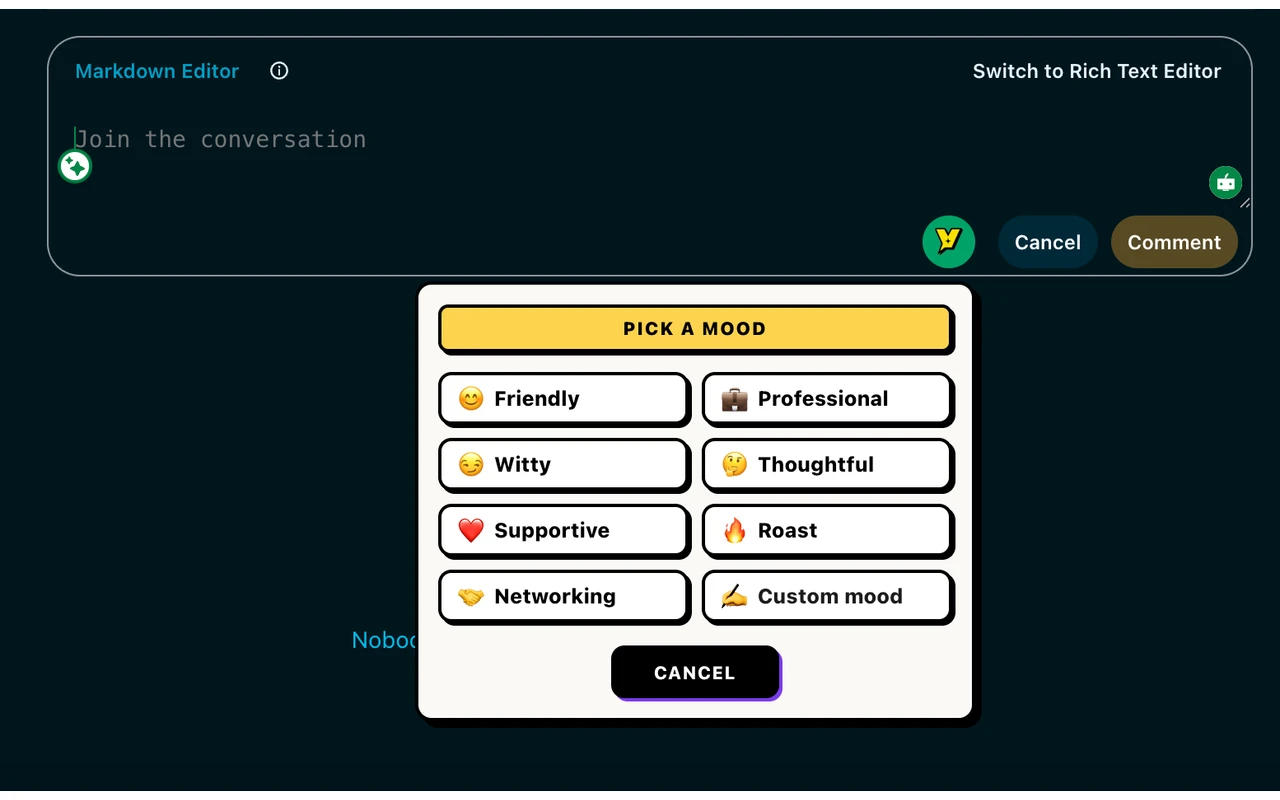
Voxily mood picker open under a comment box Human-reviewed drafting inside the social composer. No auto-posting.

By Shuvo Anirban Roy, Voxily founder · Last verified:

Written by the maker of Voxily. Competitor facts are linked below; this is not an independent review.

Compare

Which workflow fits you?

Supergrow here means supergrow.ai. Its Engage page says comments are written in Focus Mode inside Supergrow and sent through LinkedIn's official API after you click, with no browser extension to install. We did not find a current Chrome Web Store listing for Supergrow on October 3, 2026. We have not signed up for or tested Supergrow; its column uses only the pages linked below. Supergrow is a trademark of its owner. Voxily is not affiliated with Supergrow.

Voxily and Supergrow: workflow and plan comparison
CriterionVoxilySupergrow
PlatformsLinkedIn, X and Reddit.LinkedIn, as a personal profile or an authorized company page. Other platforms are not stated on their site.
Where the draft appearsInside the reply or comment box on the page, from a Voxily button in the composer.Inside Supergrow. Focus Mode shows a post from your lists beside a comment box in the app, so you do not open LinkedIn to comment.
Voice inputsA persona (role, tone, writing style, expertise), 2 to 5 of your own posts as writing examples, saved knowledge entries and one of eight moods.Content DNA, a voice profile of your tone, vocabulary, topics and point of view, plus a tone choice or custom prompt for comments.
Who postsYou. Voxily places text in the composer and never clicks post.Comments go out through its LinkedIn API connection only after you click. It also schedules and publishes posts and can auto-publish a first comment on your own post.
Free plan10 replies a day, eight moods, one persona and five knowledge entries. Account required, no card.No free plan listed. Every plan has a 7-day free trial; after it, the account pauses until you pick a plan.
Paid pricePro: $12.99/month or $120/year.Starter $19/month, Pro $39/month, Teams $139/month for 4 accounts. Its FAQ lists 20% off yearly: $16 and $31 a month for Starter and Pro. Engage, its comment tool, starts on Pro.
What else it includesPost drafts, Fix My Reply and chat. Pro adds three reply options when enabled in Settings, Custom Mood, Brand Mode, DM drafting and unlimited personas. No scheduling, analytics, CRM or team tools.Postcast AI interviews, repurposing from YouTube, articles and PDFs, scheduling with a calendar, Kanban, carousel and infographic makers, profile analytics, weekly reports and an MCP. Teams adds approval workflows and team analytics.

Sources: Supergrow homepageSupergrow pricing and FAQSupergrow Engage feature pageVoxily plans

Free or Pro

Start free. Upgrade when you need more.

Both plans include the eight standard moods, core drafting, history, and ratings.

Voxily plan differences
FeatureFreePro
Replies10 per dayHigher usage allowances
Personas / knowledge entries1 persona / 5 entriesUnlimited personas and entries
Post generations3 per dayHigher usage allowances
Chat requests / rewrites10 each per dayHigher usage allowances
Voice or import analyses3 per dayHigher usage allowances
Conversation length3 user messages per chatNo three-message limit
Fix My ReplyIncluded; uses reply allowanceIncluded; uses reply allowance
Three reply variations, Custom Mood, Brand Mode, DM draftsLocked; opens pricingIncluded; variations optional
Use case

Why Voxily fits this workflow.

Here's how Voxily handles this workflow, and what you can check yourself in the extension.

Which one fits

Pick by where you want to write the comment and what you need around it.

  • Choose Supergrow if you want AI interviews, scheduling, analytics and engagement lists for LinkedIn in one app, or if you run LinkedIn for a team with approvals.
  • Choose Voxily if you already read LinkedIn, X or Reddit and want a first draft in the comment box of the post in front of you.
  • Choose Supergrow's Focus Mode if you prefer to comment from a chosen list of people, away from the main feed.

What Supergrow does that Voxily does not

Supergrow's pages list post scheduling, AI interviews that turn a short conversation into post drafts, repurposing of videos, articles and PDFs, carousel and infographic makers, profile analytics and team approvals. It also builds engagement lists by profile URL, CSV or a post's commenters. Voxily has none of these.

What Voxily does differently

Voxily drafts in the reply box on the site you are already reading, on LinkedIn, X and Reddit, from one persona and one set of saved knowledge. Its Free plan is ongoing, not a trial, and Pro is $12.99 a month. Supergrow lists Engage from its Pro plan, $39 a month.

Workflow

Draft, review and send a reply.

Voxily drafts. You review, edit, and post the final text.

01

Pick one real post

Choose a LinkedIn post where you can add a specific point, question or example from your own work.

02

Install Voxily Free

Add it to desktop Chrome, sign in and save one persona with two or three of your own posts as writing examples. No card is required.

03

Draft in the comment box

Generate a draft, remove anything you would not say and add one detail only you know.

04

Decide what fits

If you also need interviews, scheduling or team approvals, Supergrow's trial is the fair comparison. Voxily offers no Supergrow import or migration.

FAQ

Common questions.

Quick answers before you install.

Is Voxily a full Supergrow replacement?

No. Voxily covers comment and reply drafting only. Supergrow also lists scheduling, AI interviews, repurposing, analytics and team approvals. If you rely on those, Voxily does not replace them.

Does Supergrow have a Chrome extension?

Its Engage page says there is no browser extension to install: each person connects LinkedIn through OAuth and comments from inside Supergrow. We did not find a current Chrome Web Store listing for Supergrow on October 3, 2026.

Which Supergrow plan includes AI comment drafts?

Supergrow's Engage page says Engage is available from the Pro plan onward, listed at $39 a month billed monthly. Starter, at $19, does not list Engage. Plans change, so check their pricing page before you buy.

Does Voxily post or comment for me?

No. Voxily puts a draft in the reply box on LinkedIn, X or Reddit. You edit it and click post yourself. Free gives you 10 replies a day with no card.

Install Voxily and try it in one real thread.

Start with one real reply on X/Twitter, LinkedIn, or Reddit. Keep the draft only if it sounds like something you would actually post.

Install free

Explore related workflows